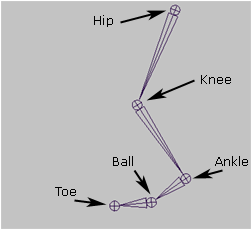
Bones
Start with the bones for the leg.
The most classic set up would be:
Reverse Foot Lock
The Reverse Foot Lock
setup is an external set of bones that drive the foot of a character. It's called a reverse foot lock because it is constructed going backwards from the heel and up the foot to the ankle.
The advantage of having this set-up is that you have an external object that can be used like foot sprints and can easily be animated and locked to the ground.
Bones
Start with the bones for the leg.
The most classic set up would be:
Hip->Knee->Ankle->Ball->Toe
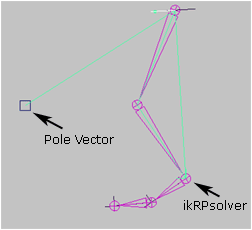
IK RP Solver
Add a Null or Cube in front of the knee which will be the controller for the
Pole Vector for the knee direction.
Add an IK RP Solver from the Hip to the Ankle.
Name it: ikHandle_Ankle
Create the Pole Vector to the cube or Null.
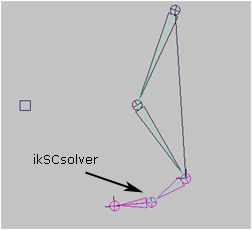
IK SC Solver 1
Add an IK SC Solver from the Ankle to the Ball.
Name it: ikHandle_Ball
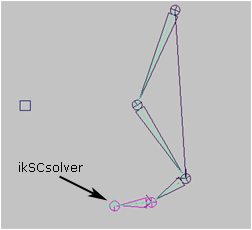
IK SC Solver 2
Add an IK SC Solver from the Ball to the Toe.
Name it: ikHandle_Toe.
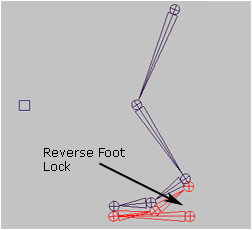
Reverse Foot Lock
Create the Reverse Foot Lock starting on the Heel of the foot and going to the
Toe then the Ball and finally the Ankle; Hence 'Reverse' since it's going backwards
through the foot.
The RFL doesn't necessarily need to be right on top of the foot geometry. It
can be slightly down so you can see it more clearly and not get confused with
which bone is which. It should look something like:
ReverseFoot->RF_Toe->RF_Ball->RF_Ankle
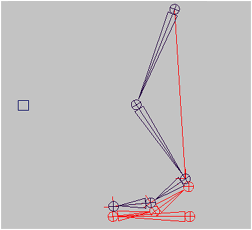
Reverse Foot Lock
Parent the ikHandle_Ankle to the RF_Ankle, the ikHandle_Ball to the RF_Ball
and the ikHandle_Toe to the RF_Toe
That's it. Now you can control the whole foot with the ReverseFoot.
Enjoy!